Heatmaps Without the Privacy Trade-off
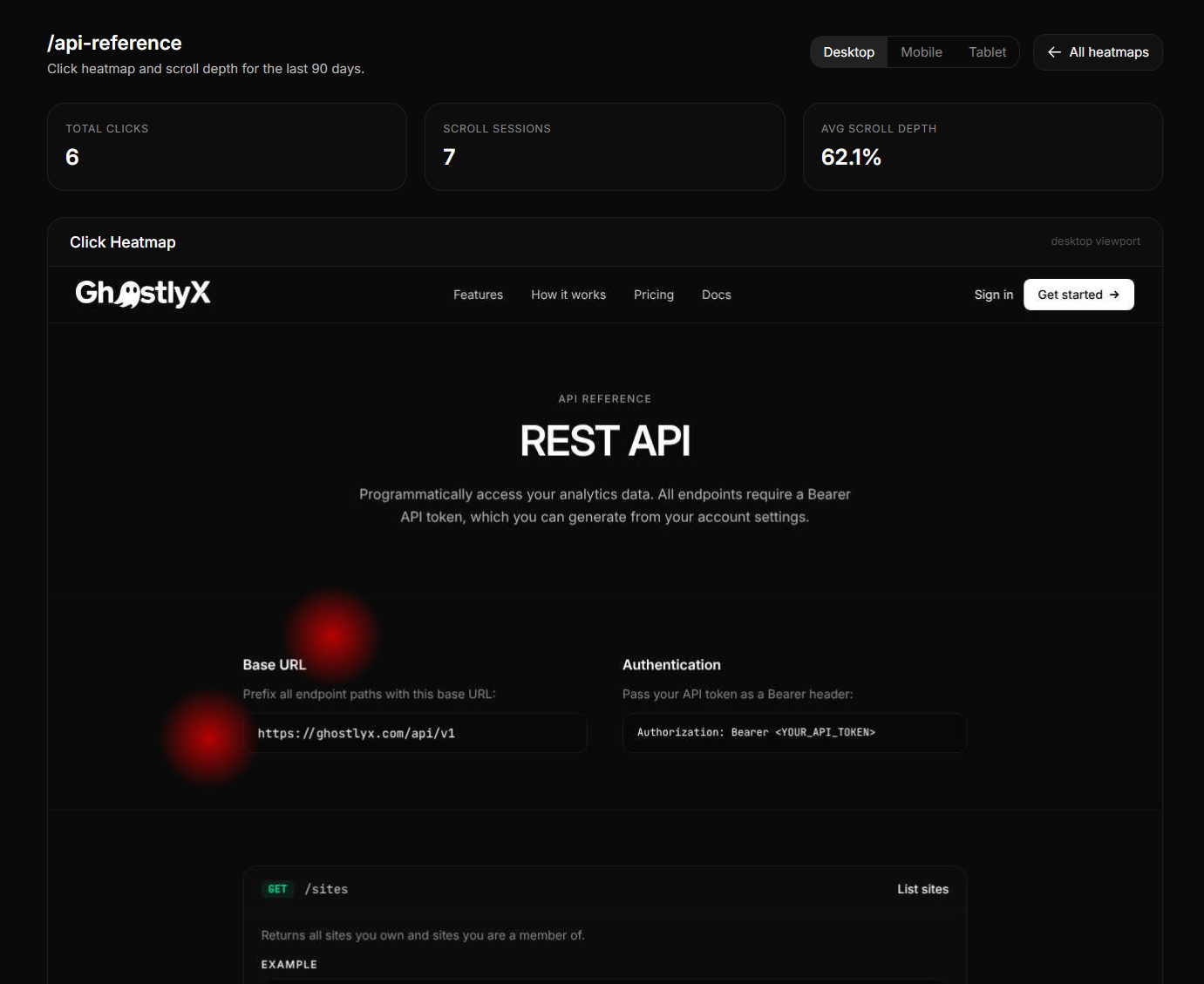
Heatmaps are one of the most useful tools for understanding how visitors interact with a web page. Where do they click? How far do they scroll? Which elements get attention and which get ignored? The answers help you make better design decisions, improve conversion rates, and stop guessing about what works.
The problem is that most heatmap tools come with a significant privacy cost. They record individual sessions, build visitor profiles, set cookies, and often send data to third parties. If your site serves visitors in the EU, that means another line item in your cookie consent banner and another data processor to document.
GhostlyX heatmaps take a different approach. They give you the same actionable insights (click density, scroll depth, per-element engagement) without collecting a single piece of personal data.
How traditional heatmap tools work
Traditional heatmap products like Hotjar, Crazy Egg, and Microsoft Clarity typically work by recording full visitor sessions. They capture mouse movements, clicks, scroll positions, form interactions, and page content. Some record video replays of entire sessions. To stitch these events together into a coherent timeline, they assign each visitor a persistent identifier, usually via a cookie.
This approach generates rich data, but it also means you are collecting personal data under GDPR. A persistent cookie identifier is personal data. A session replay that captures form inputs can inadvertently collect names, email addresses, and other sensitive information. The result: you need consent before the tool can run, and you need a data processing agreement with the provider.
How GhostlyX heatmaps work differently
GhostlyX heatmaps collect two things: where on the page a click happened, and how far down the page the visitor scrolled. That is it.
There are no session recordings. There are no mouse movement traces. There is no persistent identifier linking one visit to another. Each click is stored as an anonymous coordinate on a grid, with no connection to any visitor profile. Scroll depth is stored as a simple percentage.
Because no personal data is involved, no cookie consent is required. The heatmap script respects the same privacy signals as all GhostlyX tracking: Global Privacy Control (GPC), Do Not Track (DNT), and the GhostlyX opt-out page. If a visitor has indicated they do not want to be tracked, no data is collected.
What you can learn from privacy-first heatmaps
Even without session recordings, aggregate heatmap data tells you a lot.
Click density
A click heatmap shows you which areas of a page receive the most clicks, rendered as a colour gradient overlay on top of a screenshot of your page. Hot spots (red, orange) indicate high engagement. Cold areas (blue, transparent) indicate low engagement.
This is useful for answering questions like: are visitors clicking your primary call to action? Are they clicking on elements that are not actually links (a sign of confusing design)? Is a secondary navigation element getting more attention than your main content?
Scroll depth
Scroll depth tracking shows you what percentage of visitors reach each section of the page. If 90% of visitors see the top of your page but only 20% reach the pricing section at the bottom, you know that most of your audience never sees your pricing. You can then decide whether to move the pricing higher, shorten the page, or add a sticky element.
GhostlyX breaks scroll depth into percentiles so you can see the distribution, not just an average.
Device-specific behaviour
Click and scroll patterns differ significantly between desktop and mobile visitors. A button that is prominent on a wide screen might be buried below the fold on a phone. GhostlyX lets you filter heatmap data by device type (desktop, mobile, and tablet) so you can understand each audience separately.
Automatic screenshots
To render a meaningful heatmap overlay, you need a visual reference of the page. GhostlyX captures a screenshot of your page automatically from a real visitor session and uses it as the backdrop for the heatmap visualisation. Screenshots are refreshed periodically so the overlay stays current as your page design changes.
Screenshots are stored privately and are only accessible to authenticated site owners. They are never shared, indexed, or used for any purpose other than rendering the heatmap in your dashboard.
Data retention
Heatmap data is not stored indefinitely. GhostlyX automatically prunes old click and scroll data based on your plan's retention window. This keeps your account clean and ensures you are always looking at recent, relevant data rather than stale patterns from months ago.
Setting it up
Heatmaps are available on the Business and Scale plans. To get started:
- Open the Heatmaps section from your dashboard sidebar.
- Choose a site and click Manage to add the pages you want to track.
- Enter the pathname of each page (for example,
/pricingor/features). - Toggle tracking on or off for individual pages at any time.
Once a page is being tracked, click data begins accumulating immediately. You can view the heatmap visualisation by clicking on a tracked page in your dashboard.
The bottom line
You do not need to sacrifice your visitors' privacy to understand how they use your site. Aggregate click and scroll data, collected without cookies and without personal identifiers, gives you the design insights you need while respecting the people who visit your pages.
If you are currently using a heatmap tool that requires a cookie banner, consider whether the session replays and mouse tracking are genuinely useful, or whether a clean, anonymous click density map would answer the same questions without the compliance overhead.
GhostlyX heatmaps are available now on the Business and Scale plans. If you are on a different plan, you can upgrade from your billing settings.
Explore GhostlyX
Key features
Comparisons